
.jpg)

For many small businesses, a website is the first place potential customers interact with the brand. Whether someone discovers your business through a Google search, a social media post, or a referral, your website often becomes the deciding factor between earning a new customer and losing them to a competitor.
Yet, surprisingly, many small-business websites fail to deliver meaningful business results. They may look modern, use attractive templates, or include impressive animations, but they generate few inquiries, low engagement, and limited sales.
The problem usually isn't poor design.
It's poor planning.
Many businesses jump directly into choosing a template, hiring a designer, or comparing website builders without first asking a more important question:
What should this website actually accomplish?
A website should never exist simply because every business "needs one." It should solve a specific business problem, whether that's generating qualified leads, booking appointments, selling products, educating prospects, or validating demand for a new service.
Once that objective is clear, every decision, from the navigation and page structure to the platform, copywriting, and user experience, can be evaluated against one simple question:
Does this help visitors complete the action we want them to take?
This outcome-first approach is what separates websites that simply look professional from websites that actively contribute to business growth.
In this guide, we'll walk through how to scope, build, and validate a website design for small business, helping you avoid costly mistakes and choose the right approach for your goals.
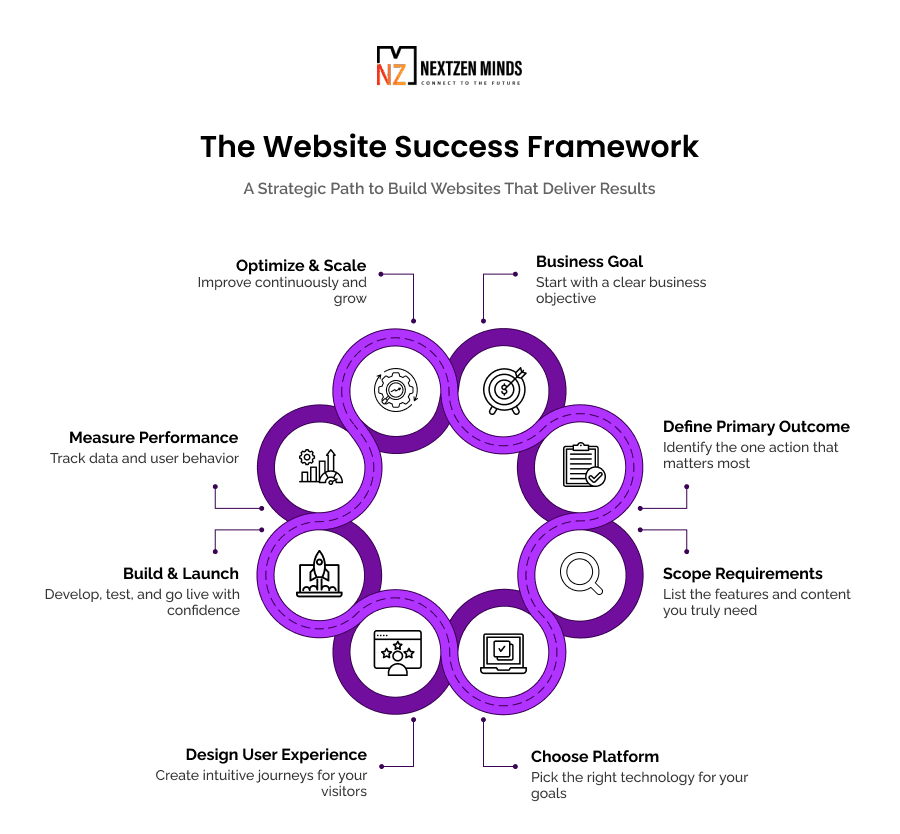
Why Most Small Business Websites Fail Before Design Starts
Many business owners assume that if a website isn't performing well, the design must be outdated.
In reality, most websites fail long before anyone chooses colors, layouts, or typography.
The failure begins during the planning stage.
Without clearly defining what success looks like, designers and developers are left making decisions based on assumptions instead of business objectives. The result is often a visually polished website that doesn't generate inquiries, support sales, or improve customer experience.
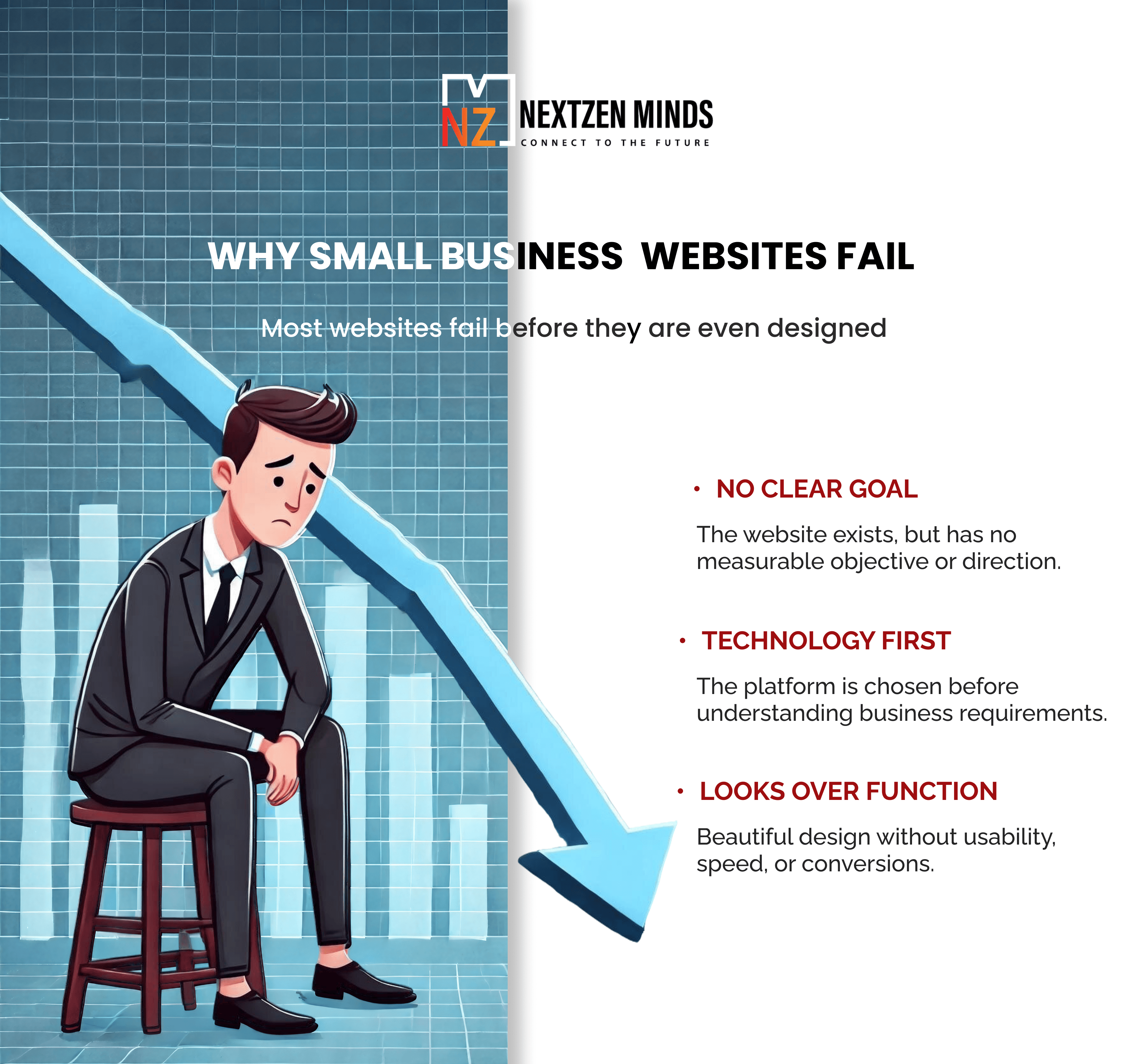
The three most common planning mistakes:
1. No defined business objective
Some businesses create a website simply because they believe every company should have one.
That's not a strategy.
A website should have a measurable purpose, such as:
- Generate consultation requests.
- Increase appointment bookings.
- Sell products online.
- Capture qualified leads.
- Build credibility before an offline purchase.
- Validate demand for a new offering.
Without a primary objective, every page ends up competing for attention instead of guiding visitors toward a single outcome.
2. Choosing technology before defining requirements
One of the most common mistakes is selecting a platform before understanding what the website needs to do.
Business owners often ask:
- Should I use WordPress?
- Is Shopify better?
- Should I use Wix or Squarespace?
These questions matter, but only after you've identified your business requirements.
A simple informational website has very different technical needs than a business requiring:
- Customer portals,
- Booking systems,
- Payment gateways,
- CRM integration,
- Inventory management,
- Membership functionality,
- Multi-location management.
Choosing technology too early often leads to expensive rebuilds later.
At NZMinds, we follow a simple principle:
Scope before stack.
Technology should support business goals, not define them.
3. Prioritizing appearance over usability
Professional visuals certainly matter.
They influence trust and credibility.
But appearance alone doesn't create customers.
Visitors care far more about whether they can quickly answer questions like:
- What does this business offer?
- Is it relevant to my needs?
- Can I trust them?
- What should I do next?
If the navigation is confusing, pages load slowly, or contacting the business feels difficult, beautiful visuals won't compensate.
Successful websites balance aesthetics with clarity, performance, and usability.
Also Read: Bridging Functionality and Aesthetics: The Ultimate Guide to Effective UI/UX Design
What Should a Small Business Website Actually Accomplish?
Every successful small business website is designed around one primary business outcome.
Trying to achieve five different goals equally usually means achieving none of them particularly well.
Instead, determine the single action that matters most to your business.
Common Primary Objectives Include
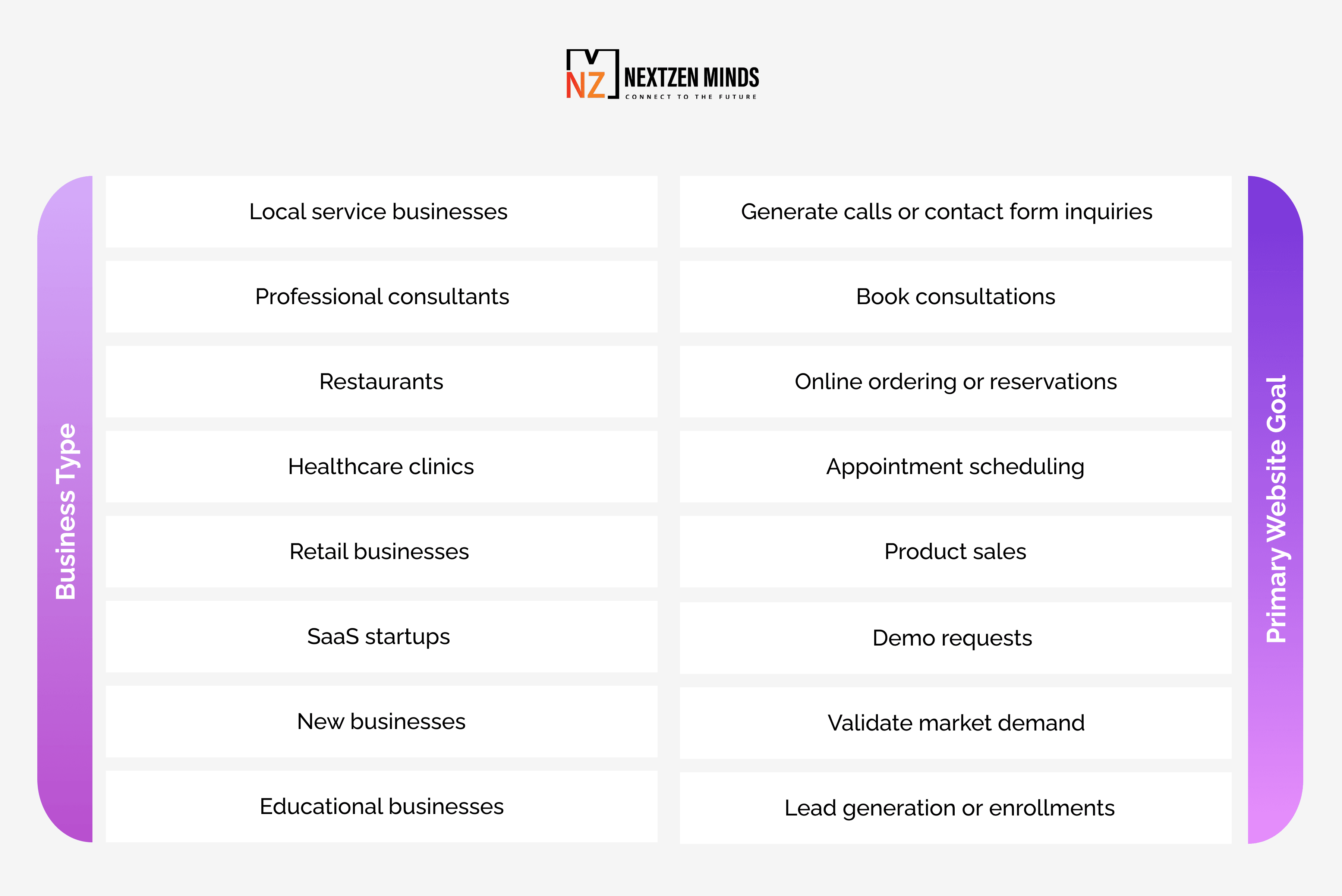
Once this primary objective is defined, everything else becomes supportive.
For example:
- Blog articles improve organic visibility.
- Testimonials build trust.
- FAQs reduce buyer hesitation.
- Downloadable resources nurture future customers.
These secondary elements should always reinforce, not compete with, the website's primary purpose.
Scope Before You Build: The Most Important Step Most Businesses Skip
Scoping isn't simply writing a list of pages.
It's the process of understanding what your website needs to accomplish before design or development begins.
This single exercise can save thousands of dollars in unnecessary redesigns.
Before selecting a platform or hiring website designers for a small business, answer these questions.
Who is your ideal customer?
Understanding your audience influences everything from messaging to navigation.
Consider:
- What problems are they trying to solve?
- What information do they need before contacting you?
- Which devices do they typically use?
- How technically comfortable are they?
- What questions do they ask most often?
The clearer your audience profile, the easier it becomes to design intuitive user journeys.
What action should visitors take?
Every page should encourage one primary action.
Examples include:
- Schedule a consultation,
- Request a quote,
- Purchase a product,
- Download a guide,
- Call your business,
- Book an appointment.
Multiple competing calls-to-action often reduce conversions because visitors become overwhelmed by too many choices.
What functionality do you actually need?
Avoid paying for features you'll never use.
Ask yourself whether your website truly requires:
- Online payments,
- Appointment scheduling,
- Customer dashboards,
- Live chat,
- CRM integration,
- Inventory management,
- Multi-language support,
- Customer login areas.
If the answer is no, keep the build simpler.
Complexity should always be justified by business value.
How will success be measured?
Without measurement, it's impossible to know whether your investment is working.
Before launch, establish metrics such as:
- Contact form submissions,
- Phone calls,
- Booked appointments,
- Sales,
- Newsletter sign-ups,
- Conversion rate,
- Average session duration,
- Bounce rate.
These metrics become your baseline for continuous improvement after launch.
What Makes Great Website Design Today?
Modern website design for small businesses goes far beyond attractive visuals.
A successful website combines design, technology, psychology, and marketing into one cohesive experience.
Some of the characteristics shared by high-performing websites include:
- Mobile-first responsive design.
- Clear navigation.
- Fast page loading.
- Accessible layouts.
- SEO-friendly architecture.
- Trust-building content.
- Simple user journeys.
- Strong calls-to-action.
- Secure infrastructure.
- Easy content management.
Good design reduces friction.
Great design removes it entirely.
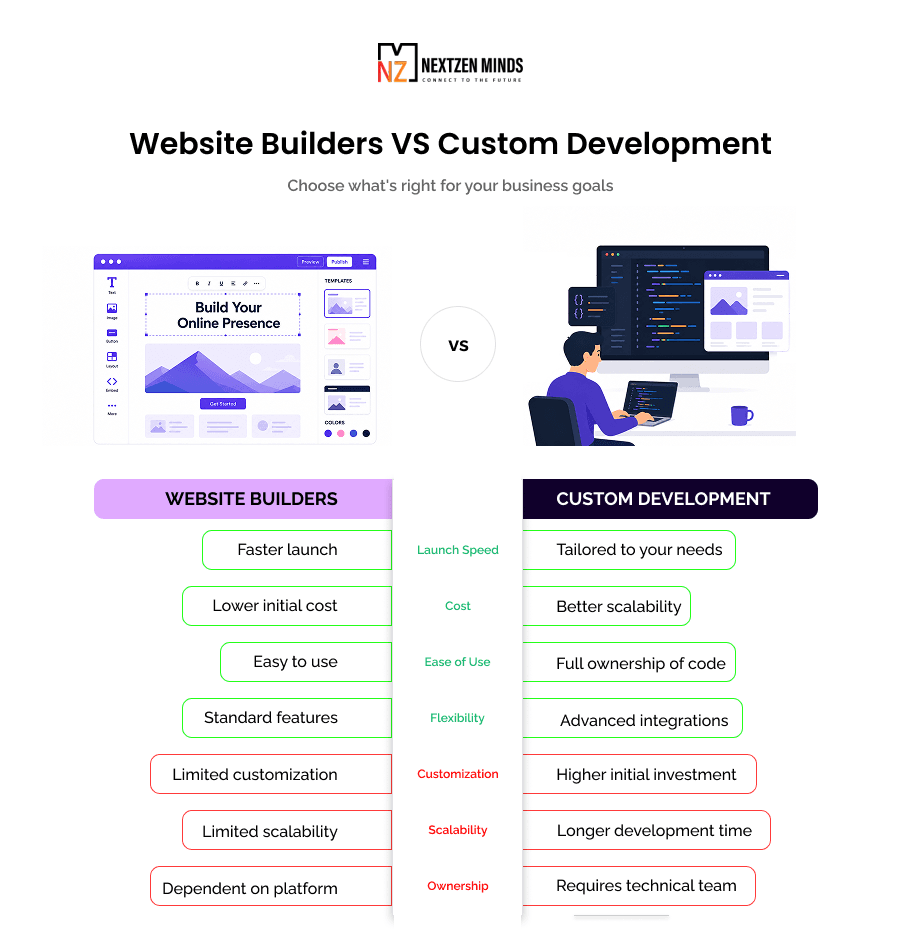
Choosing Between Website Builders and Custom Development
One of the biggest decisions you'll make while creating a small business website is deciding how it should be built. Should you use a website builder, hire a freelancer, or partner with a professional development company?
There isn't a universally "best" option. The right choice depends on what your website needs to achieve today, and where your business expects to be in the next few years.
Businesses often choose the cheapest or fastest solution without considering long-term growth. While this may reduce initial costs, it can also create limitations that require expensive redesigns later.
The key is to select a solution that aligns with your current requirements while leaving room for future expansion.
Website Builders for Small Business: When They Make Sense
Modern website builders for small businesses have improved significantly. Platforms like WordPress, Wix, Squarespace, Shopify, and Webflow allow businesses to launch professional websites quickly without extensive development work.
For many startups and local businesses, they're a practical place to begin.
A website builder is usually a good choice when:
- You need a brochure-style website.
- Your products or services are relatively straightforward.
- You're working with a limited budget.
- Speed to launch is more important than advanced customization.
- You have time to maintain the website yourself.
- Your business processes match the platform's built-in capabilities.
These platforms typically include:
- Responsive templates,
- Basic SEO tools,
- Blog functionality,
- Contact forms,
- Basic analytics,
- Security updates,
- Hosting,
- Drag-and-drop editing.
For businesses with standard requirements, this combination is often sufficient.
When a Website Builder Starts Holding You Back
As businesses grow, their website often evolves from a digital brochure into an operational tool.
You may begin needing:
- Customer portals,
- Appointment workflows,
- CRM integration,
- Inventory synchronization,
- Custom pricing logic,
- Multi-step booking systems,
- Membership functionality,
- API integrations,
- Custom dashboards.
These requirements quickly expose the limitations of template-based platforms.
Instead of helping your business, the platform begins forcing your business to adapt to its limitations.
That's usually the point where custom development becomes a better long-term investment.
A simple question often helps clarify the decision:
Are you building your business around the website, or forcing your business to work around the website builder?
If it's the latter, you've probably outgrown your current platform.
DIY Website vs Hiring Website Designers for Small Business
Many owners wonder whether they should build the website themselves or hire professionals.
Again, the answer depends less on budget and more on business priorities.
DIY Website Builders
DIY solutions work well when:
- The website is informational.
- Your offerings are relatively simple.
- You're comfortable managing updates.
- Time is available for learning the platform.
- Custom functionality isn't required.
Advantages include:
- Lower upfront cost,
- Faster launch,
- Full editing control,
- Minimal technical knowledge required.
Potential drawbacks include:
- Limited scalability,
- Template restrictions,
- Performance limitations,
- Generic design,
- Growing maintenance burden.
Hiring Website Designers for Small Business
Professional website designers for small businesses provide value beyond visual design.
An experienced team considers:
- User experience,
- Conversion optimization,
- SEO architecture,
- Performance,
- Accessibility,
- Technical scalability,
- Analytics implementation,
- Long-term maintenance.
The result isn't simply a better-looking website; it's a website intentionally built to achieve business goals.
Hiring professionals becomes particularly valuable when your website directly contributes to revenue generation.
Understanding Small Business Website Cost
One of the most frequently asked questions is:
How much does a small business website cost?
The honest answer is that cost depends almost entirely on scope.
Rather than asking, "How much does a website cost?" ask:
What does this website need to do?
The answer determines almost everything else.
Factors that influence small business website cost
Several variables affect pricing:
- Number of pages,
- Custom design requirements,
- Content creation,
- SEO implementation,
- E-commerce functionality,
- Booking systems,
- Third-party integrations,
- Custom development,
- Hosting infrastructure,
- Ongoing maintenance,
- Security requirements.
Two websites may both have ten pages, yet one costs five times more because it includes complex business logic behind the scenes.
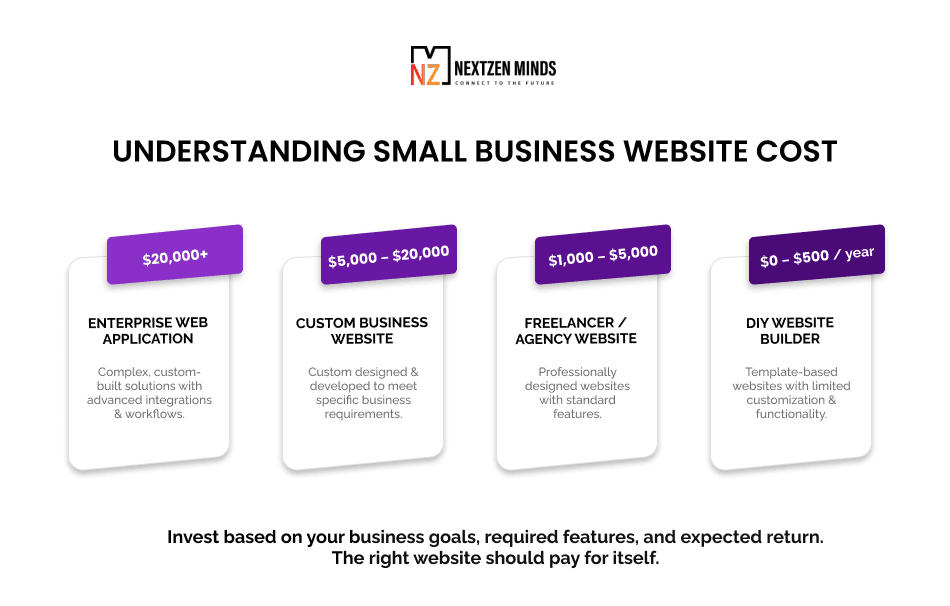
Typical website investment ranges
While every project differs, businesses can generally expect:
Rather than pursuing the cheapest option, focus on total value over the website's lifecycle.
A well-built website often pays for itself through improved lead generation, better customer experience, and reduced operational friction.
Planning the Right Website Structure
One mistake many businesses make is creating pages simply because competitors have them.
Instead, every page should exist because it supports a customer decision.
A focused website almost always outperforms a large website filled with unnecessary content.
The essential pages most small businesses need
Home
The homepage should immediately answer:
- Who are you?
- What do you offer?
- Who is it for?
- Why should visitors trust you?
- What should they do next?
Avoid generic marketing language.
Clarity consistently outperforms cleverness.
Services or Products
This section should explain exactly what customers receive.
Instead of listing features, focus on:
- Problems solved,
- Outcomes delivered,
- Industries served,
- Process,
- Frequently asked questions.
Customers rarely buy services.
They buy solutions.
About
Many businesses make the About page entirely about themselves.
Instead, use it to build credibility by demonstrating:
- Experience,
- Team expertise,
- Certifications,
- Company values,
- Client success stories,
- Industry specialization.
Visitors are asking:
"Why should I trust this company?"
Your About page should answer that clearly.
Contact
Your contact page should remove every possible barrier.
Include:
- Contact form,
- Phone number,
- Email address,
- Business hours,
- Location,
- Google Maps (where relevant),
- Booking options,
- Response expectations.
Don't make visitors search for ways to reach you.
Social Proof
Trust significantly influences purchasing decisions.
Include:
- Customer testimonials,
- Reviews,
- Case studies,
- Before-and-after examples,
- Awards,
- Certifications,
- Client logos.
Social proof reduces uncertainty, particularly for first-time visitors.
Mobile-First Website Design Is No Longer Optional
Today, the majority of visitors discover businesses on mobile devices.
Designing for desktop first and "shrinking" everything for mobile creates poor experiences.
Instead, websites should be designed for mobile from the beginning.
A mobile-friendly small business website should include:
- Fast loading pages,
- Large tap targets,
- Readable typography,
- Simple navigation,
- Click-to-call buttons,
- Mobile-friendly forms,
- Optimized images.
Google also evaluates mobile usability when ranking websites, making mobile optimization important for both user experience and search visibility.
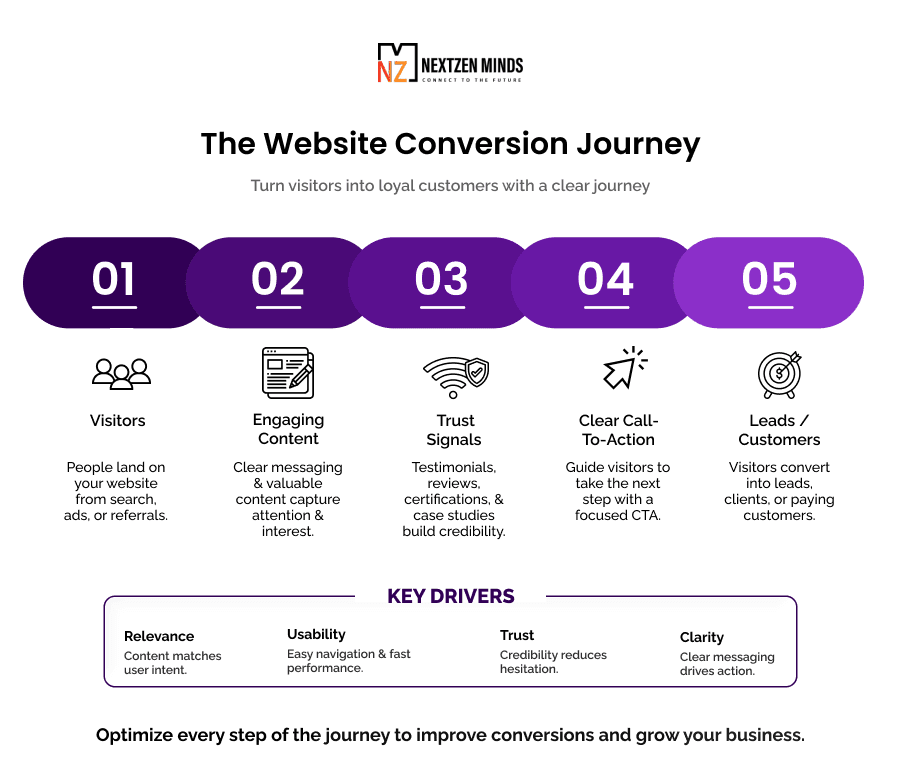
Design for Conversions, Not Just Appearance
Many websites focus heavily on visual aesthetics while overlooking conversion strategy.
Beautiful interfaces attract attention.
Clear user journeys generate business.
Every page should answer one simple question:
What action should visitors take next?
That action might be:
- Request a quote,
- Schedule a consultation,
- Buy a product,
- Download a guide,
- Contact your team.
Avoid presenting multiple competing actions with equal importance.
Instead, establish a clear visual hierarchy.
Also Read: Why Your Business Needs Staff Augmentation in 2025: The Ultimate Guide to Smarter Staff Hiring
The NZMinds CTR Framework Applied to Website Design
At NZMinds, we use a practical framework that applies equally well to website experiences.
Control
Every page should have one primary objective.
Remove distractions that compete with it.
Transparency
Visitors should always understand:
- Where they are.
- What happens next.
- What information is required.
- How long the process takes.
Clear expectations reduce hesitation.
Recovery
Not every visitor is ready to buy immediately.
Provide alternative ways to stay connected:
- Newsletter signup,
- Downloadable resources,
- Callback requests,
- Consultation booking,
- Educational content.
Recovery paths capture future opportunities without interrupting the primary conversion flow.

Build SEO into Your Website from Day One
Many small businesses treat search engine optimization as something to "add later." Unfortunately, fixing SEO after a website has been built is often more expensive and less effective than getting it right from the beginning.
Good SEO starts with good website architecture. Search engines need to understand your content, while users need to find information quickly and intuitively. When both requirements are met, your website becomes easier to discover and easier to use.
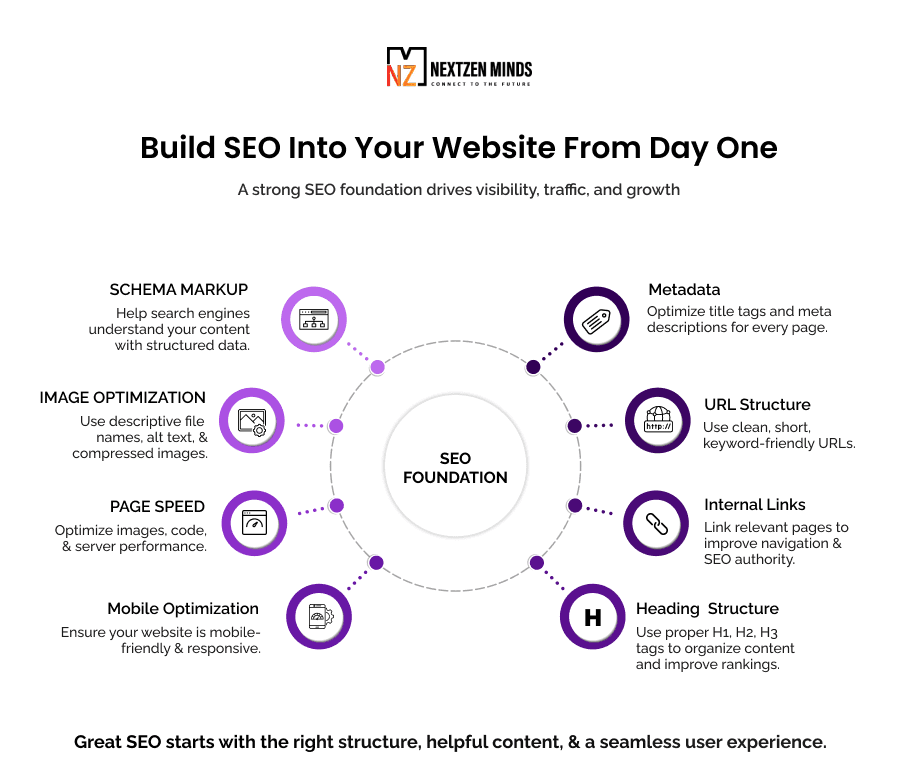
Some SEO best practices to include during the design phase include:
- Creating clear, descriptive URLs.
- Writing unique title tags and meta descriptions for every page.
- Organizing content with logical heading structures (H1, H2, H3).
- Optimizing images with descriptive file names and alt text.
- Ensuring pages are mobile-friendly and responsive.
- Building an internal linking structure that helps both users and search engines navigate your website.
- Including schema markup where appropriate.
- Designing pages around user intent rather than keyword stuffing.
SEO shouldn't feel separate from website design; it should be part of every design decision.
Website Performance Matters More Than You Think
Even the best-designed website loses value if visitors leave before it finishes loading.
Research consistently shows that slow websites increase bounce rates, reduce conversions, and negatively affect search rankings. Visitors expect websites to load almost instantly, especially on mobile devices.
Performance optimization should therefore be considered a core part of website design rather than a technical afterthought.
Ways to improve website performance
- Compress and optimize images.
- Minimize unnecessary animations and scripts.
- Use browser caching.
- Choose reliable hosting.
- Reduce plugin dependency.
- Optimize CSS and JavaScript files.
- Implement lazy loading where appropriate.
- Monitor Core Web Vitals regularly.
For most small businesses, improving load speed often produces a better return than adding another feature.
Security Should Never Be Optional
A small business website may not process millions of transactions, but that doesn't mean it's safe from cyber threats.
In fact, smaller businesses are frequently targeted because attackers assume their security practices are less mature.
Basic website security protects both your business and your customers.
Every website should include:
- HTTPS encryption,
- Regular software updates,
- Secure hosting,
- Strong administrator authentication,
- Automated backups,
- Malware monitoring,
- Firewall protection,
- Secure form validation,
- Role-based user permissions where applicable.
Security isn't just about preventing attacks.
It also builds trust.
Visitors are more likely to share information or complete purchases when they feel confident that their data is protected.
Choosing the Right Web Development Partner
If you've decided that professional development is the right path, selecting the right web development partner becomes one of the most important decisions you'll make.
Many agencies showcase attractive portfolios, but beautiful websites alone don't guarantee business results.
A strong development partner begins by understanding your business, not recommending technology.
What to look for
They ask business questions before technical questions
A good partner wants to understand:
- Your customers,
- Revenue model,
- Business goals,
- Current challenges,
- Future growth plans.
Only then should conversations move toward frameworks and platforms.
They recommend the simplest solution that works
Custom development isn't always necessary.
An honest partner should be willing to recommend a website builder or CMS if it adequately meets your needs.
Technology should solve problems, not increase project scope unnecessarily.
They discuss long-term ownership
Your website shouldn't become dependent on one developer.
Ask questions such as:
- Who owns the code?
- How are updates handled?
- Can another developer maintain the website?
- Is documentation included?
- What happens after launch?
Long-term maintainability is just as important as launch day.
They measure success after launch
Building the website is only the beginning.
A good partner should also discuss:
- Analytics,
- Conversion tracking,
- Performance monitoring,
- Continuous improvements,
- A/B testing,
- Ongoing optimization.
Websites should evolve based on real customer behavior, not assumptions.
Validate Before You Scale
Launching a website isn't the finish line.
It's the beginning of learning how customers actually interact with your business online.
Before investing heavily in advertising or adding new functionality, validate that your website is already performing as intended.
Ask yourself:
- Are visitors completing the primary action?
- Which pages generate the most inquiries?
- Where do users leave the website?
- Which traffic sources convert best?
- How does mobile performance compare with desktop?
- Are forms being completed successfully?
- Which pages receive little or no engagement?
These insights should guide future improvements.
At NZMinds, we follow a simple philosophy:
Build less. Validate early. Improve continuously. Scale only what works.
This approach reduces unnecessary development while helping businesses invest confidently
Common Website Design Mistakes Small Businesses Make
Even well-intentioned projects can lose momentum because of avoidable mistakes.
Some of the most common include:
- Designing before defining business goals.
- Choosing technology based solely on popularity.
- Trying to satisfy every possible audience.
- Overloading pages with information.
- Hiding contact options.
- Ignoring mobile users.
- Publishing slow-loading pages.
- Neglecting accessibility.
- Forgetting SEO during development.
- Launching without analytics.
- Adding unnecessary features.
- Failing to update content regularly.
Notice that very few of these mistakes relate to colors or visual design.
Most are planning and usability issues.
That's why successful projects begin with strategy, not software.
The 14-Point Small Business Website Readiness Checklist
Before launching your small business website or redesigning an existing one, use this checklist to ensure you're building a website that's ready to attract, engage, and convert visitors.
- You can clearly define your website's primary business objective.
- Every page has one clear and measurable call-to-action.
- Your website is fully responsive and delivers a seamless mobile experience.
- Visitors can find important information within three clicks.
- Contact details and conversion paths are visible on every key page.
- Your website loads quickly on both desktop and mobile devices.
- SEO essentials, including metadata, headings, internal links, and image optimization, are implemented.
- Analytics and conversion tracking are configured before launch.
- Customer testimonials, reviews, certifications, or other trust signals are prominently displayed.
- Security measures such as HTTPS, regular updates, and secure hosting are in place.
- Content answers real customer questions instead of focusing only on the business.
- Accessibility best practices (readable fonts, sufficient contrast, descriptive alt text, keyboard navigation where applicable) have been considered.
- Forms are simple, easy to complete, and ask only for necessary information.
- You have a plan to monitor performance, gather user feedback, and continuously improve the website after launch.
If you can't confidently check every item, prioritize closing those gaps before investing more in marketing, advertising, or additional website features. A well-planned website consistently delivers better long-term results than one that simply launches quickly.
Frequently Asked Questions
1. How much does website design for a small business cost?
The cost depends primarily on the website's scope, functionality, and complexity. A simple informational website typically requires a much smaller investment than a custom platform with booking systems, payment processing, or third-party integrations. Instead of starting with a budget, begin by defining what your website needs to accomplish.
2. Should I use website builders for a small business or hire a developer?
Website builders are ideal for businesses with straightforward requirements, limited budgets, and standard functionality. If your website supports revenue-generating workflows, requires integrations, or needs room to scale, working with experienced website designers or developers is often the better long-term decision.
3. How long does it take to build a small business website?
A basic website can often be completed within a few weeks, while larger custom projects may take several months depending on complexity, approvals, content preparation, and integrations. Clear project scoping significantly reduces delays.
4. What makes a small business website successful?
Successful websites combine clear messaging, intuitive navigation, fast performance, mobile responsiveness, trust-building content, search engine optimization, and a strong call-to-action. More importantly, every design decision should support a clearly defined business objective.
5. When should I redesign my existing website?
Consider a redesign if your website loads slowly, isn't mobile-friendly, fails to generate leads, no longer reflects your business, is difficult to update, or cannot support new functionality required for business growth.
6. Why is choosing the right web development partner so important?
A capable web development partner helps you define requirements before development begins, recommends the most appropriate technology, and builds a website that supports long-term business growth rather than simply delivering an attractive design.
Conclusion
A successful website design for a small business isn't measured by how modern it looks; it's measured by how effectively it helps your business grow.
Every decision, from planning and platform selection to navigation, content, and performance, should support a clearly defined business objective. Businesses that begin with strategy consistently make better technology decisions, avoid unnecessary costs, and build websites that continue delivering value long after launch.
Whether you're creating your first website or replacing one that's no longer meeting your needs, resist the temptation to jump straight into templates or technology. Define the outcome first, validate your assumptions, and build only what supports your customers and your business goals.
When your website is treated as a business asset rather than a design project, it becomes one of the most valuable investments your company can make.