
Ready-to-Use Tools vs Customized CRM Tools - What Should You Really Use in 2025?
June 2, 2025
June 2, 2025
Let’s imagine: You’re running a high-performing team, the goals are set, the product is solid, but projects still fall behind, customer data is scattered, and reports feel… off. You’re not alone.For thousands of businesses, the culprit isn’t the people or the process, it’s the software. Generic CRM tools and project managers promise the world, but rarely do they deliver exactly what your business needs. So here’s the real question: Should you keep adjusting your workflows to fit your tools, or should your tools adapt to fit your workflows?Let’s break this down. Once and for all.
Off-the-shelf CRM automation tools offer speed and convenience. They're especially attractive for businesses seeking quick deployment and pre-built integrations. But every “plug-and-play” tool has its trade-offs.
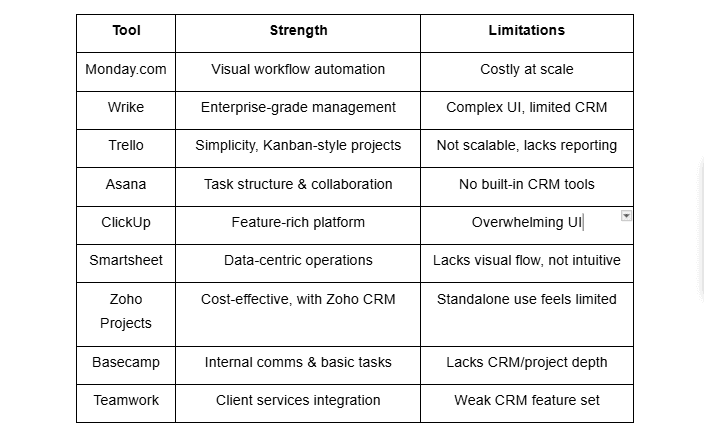
Below are nine of the most popular ready-to-use CRM project management tools and how they perform in real-world business scenarios.
1. Monday. com:Why People Love It: Monday. com’s colorful, customizable boards and templates make it easy to get started. It caters to sales, marketing, and operations, and supports automation through simple workflows.What’s Missing: As your workflows become more complex, the limitations of Monday’s templates become noticeable. Custom integrations often require third-party apps or developers. It’s also pricey as you scale.
2. Wrike:Why People Love It: Wrike is built for enterprise-grade teams. It has strong Gantt charts, approval flows, workload balancing, and native time tracking. It’s a hybrid between project management and performance tracking.What’s Missing: The interface is less intuitive for non-technical users. Also, CRM-specific features like sales funnel tracking or lead scoring aren’t native and require integrations.
3. Trello:Why People Love It: Trello thrives in simplicity. Its Kanban board design is perfect for visual thinkers and task-based teams. It's ideal for freelancers and startups.What’s Missing: For growing businesses needing workflow automation, CRM data tracking, or time logging, Trello shows its limitations fast. It doesn’t scale well into a full IT CRM tool.
4. Asana:Why People Love It: Asana provides multiple views (list, board, calendar, timeline) and a strong task management foundation. Great for collaboration, particularly in marketing and product teams.What’s Missing: There’s no built-in CRM. If you want to manage customers, sales pipelines, or tickets, you'll need third-party plugins or integrations.
5. ClickUp:Why People Love It: A jack-of-all-trades platform. ClickUp combines docs, task boards, chat, and CRM features in a single system. It’s budget-friendly and includes automation capabilities.What’s Missing: The flexibility comes at a cost - complexity. Many users find the interface overwhelming. Some features feel underdeveloped compared to standalone tools.
6. Smartsheet:Why People Love It: Think of it as Excel on steroids - with automation, file attachments, and workflows. Perfect for data-heavy teams.What’s Missing: If you want visually rich dashboards or intuitive navigation, Smartsheet can feel dry. CRM project management features also require advanced setup.
7. Zoho Projects:Why People Love It: Part of the Zoho ecosystem, it offers excellent value with built-in time tracking, task dependencies, and milestone management. Works well with Zoho CRM.What’s Missing: Without Zoho CRM, you’ll miss the full value. The UI also feels dated and less customizable compared to newer tools.
8. Basecamp:Why People Love It: Clean interface, strong internal communication, and simplified project structure. Great for internal teams and remote collaboration.What’s Missing: It lacks advanced project management features like time tracking or CRM automation. It’s intentionally minimal, which can limit growing teams.
9. Teamwork:Why People Love It: Ideal for client service teams. Features include invoicing, time logging, and client portals. Integrates with tools like HubSpot.What’s Missing: CRM features are not deeply integrated. May require syncing with dedicated CRM software for full lifecycle visibility.
In Summary:
You learned about the top ready-to-use tools and their benefits or drawbacks. What if you can have your own customized CRM tool, specially curated for your business? Sounds perfect, right? Here comes the service of custom software development and a reliable IT company. How exactly can you benefit from them? Here’s a list for you:
1. Tailored to Fit, Not Forced to Adapt:One of the key frustrations with generic tools is “fitting square pegs into round holes.” You shape your business process around the tool, rather than the tool adapting to you.Custom CRM automation tools are built based on your team’s real habits, goals, and systems, eliminating friction and boosting adoption.
The World Bank highlights that digital personalization increases efficiency by directly aligning software design with strategic business outcomes.
2. Scalability and Control:With custom-built tools, you define how things evolve, not a third-party vendor. You can scale users, add features, and redesign dashboards without waiting for the next product update.Plus, custom tools prevent vendor lock-in, ensuring your IT CRM tool remains truly yours.
3. Deeper Integration with Your Existing Stack:Custom CRM project management tools are built to integrate seamlessly with your existing tech stack, from internal systems to third-party applications, ensuring a smooth flow of data and operations without disrupting your current workflows.According to McKinsey, seamless cross-platform integration can reduce operational silos and improve productivity by 25-30%.
4. Data Privacy and Compliance from the Ground Up:If your business is in a regulated industry, like finance, healthcare, or education, compliance isn’t just “nice to have,” it’s mandatory. A customized solution allows built-in GDPR, HIPAA, or SOC2 compliance from day one.You also gain control over your data architecture, something most SaaS platforms don’t allow.
5. Business Intelligence that Makes Sense:Why use someone else’s reporting format when you can get insights that match your strategy? A tailored CRM automation tool delivers exactly the metrics you want, and none of the clutter.According to the IMF, the ability to extract context-specific insights from operational data is a key factor in improving decision-making agility.
6. No Feature Bloat, No Unused Modules:Generic tools come packed with features. That sounds good, until you realize you’re paying for things you never use. Custom tools are streamlined. Every button, every screen, every function serves a purpose aligned with your workflow.
7. Long-Term ROI:Although custom software development involves upfront investment, over time, the reduced licensing costs, greater productivity, and higher adoption deliver a superior return.You stop paying for inefficiencies and start building competitive advantage.
At NextZen Minds, we don’t believe in one-size-fits-all. We build scalable, custom CRM automation tools that actually work for your team, not against it.
Whether you need a CRM project management tool, internal workflow automation, or a full business management suite, we specialize in:
We’ve helped startups, enterprises, and mid-market firms across the U.S. modernize their operations and stop settling for “almost right” tools.
🔹 Ready to build software that works the way you do? 👉 Talk to our expert team today →
A CRM tool focuses on managing customer data and sales pipelines, while a CRM project management tool combines that with task tracking, scheduling, and workflow automation.
Yes. While upfront development costs may be higher, you save on recurring fees, reduce inefficiencies, and increase productivity over time.
On average, it takes 6-12 weeks for MVPs and 3-6 months for complex, enterprise-grade tools.
Finance, healthcare, eCommerce, real estate, and professional services typically see the highest ROI from tailored solutions.